Javascript Destructuring - Extraction (The Fun Way🧑🏽💻)
Search for a command to run...
No comments yet. Be the first to comment.
Cases and their uses.

Console API of Javascript scripts provide a lot more than just console.log. Here are some of my observations & learning on the Console API. Also, a few tips that I use for logging are added at the end - Feel free to stick till the end. 1. console.log...

Have you ever wondered, how would your webpage look when printed? 🤔 And you don't have a printer? or you don't want to waste a ton of papers for development? Chrome dev tools got you covered! Following are the steps to check your print preview in Ch...

According to MDN, NaN is a property of the global object. In other words, it is a variable in global scope. The initial value of NaN is Not-A-Number — the same as the value of Number.NaN. In modern browsers, NaN is a non-configurable, non-writable ...

> Generally, decorators in programming are used to add some additional meaning/function to a method, variable or a class. I have used a lot of decorators while working in Spring Boot. I am currently learning Typescript and decorators fascinated me....

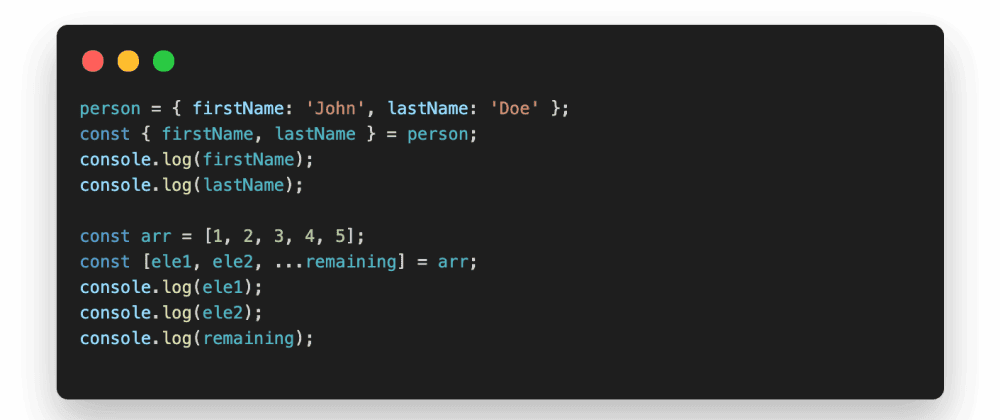
Struggle of every developer is to minimize the boilerplate and maximize the efficiency. This is where the Destructuring pitches in for JavaScript, to make it more understandable, simple and a clean one.
const { propertyName1, propertyName2 } = objectName;
{% twitter 1260528395634368514 %}
As mentioned above example, the 3 lines used for extracting 3 properties (name, age & gender) from the person object, is reduced to a single line using shorthand destructuring. If we need to extract N properties to variables, we would need N statements, but we could do that in 1 statement using destructuring.
   // Convention Using Index
   const element1 = array[0];
   const element2 = array[1];
   // Destructuring
   const [ element1, element2, ...remaining ] = array;
{% twitter 1261661975202770945 %}
Conventionally elements of the array are extracted using the index of the element, but using ES6 destructuring we can get the values of the mentioned indexes in a single statement. Also by using the ... - spread operator, we could collect the remaining elements as array into a single variable.
   // Alias name
   const { propertyName: aliasName } = objectName;
{% twitter 1260826271367323648 %}
Aliases helps in extracting similar properties from different objects. This finds many real-time application in modern programming.
   // Default values - Object
   const { propertyName = defaultValue } = objectName;
   // Default values - Array
   const [ element1 = value1, element2 = value2 ] = array;
{% twitter 1261176724160540673 %}
Sometimes, we might not be sure if the property is present in the required object or an element in a particular index position, but those values returning as undefined would break the application. This is where the default values come in.
The above mentioned concepts can be used for the destructuring the incoming object or array in the method signatures. Hope the below snippet explains them.
   const welcomeUser = ({ name: username = 'Anonymous', topics }) => {
      // Moved the below logic to the function signature.
      // const {name: username = 'Anonymous', topics} = user;
      console.log(`${username} has subscribed to the following topics -
                   ${topics.join(', ')}`);
   }
   welcomeUser({
      name: 'John Doe',
      topics: ['nodejs', 'javascript', 'deno']
   });
   // John Doe has subscribed to the following topics - nodejs, javascript, deno

   welcomeUser({
      topics: ['react', 'javascript', 'angular']
   });
   // Anonymous has subscribed to the following topics - react, javascript, angular
I have recently started with the #100DaysOfCode challenge in Twitter. Follow on here to stay connected and improve each other.
Thanks for reading this far. This is my first attempt in writing a technical blog, any feedback would be appreciated.